Node搭建简单的web服务器

http

下面是搭建简单的web服务器例子,共有4个版本。

简单的web服务器(版本一)

使用node构建一个简单的web服务器。

具体步骤如下:

1、引入http模块

2、使用http.createServer()来创建一个 Web服务器

3、服务器具体的功能:接收并且返回消息给浏览器

这里包括3个部分:接收消息,处理接收的消息,返回消息

  • 接收消息–request
  • 处理接收的消息
    • 在server.on()方法里面处理请求并且返回字符串“hello,hahahahah~”
  • 返回消息–response

4、绑定端口号,启动服务器

1
2
3
4
5
6
7
8
9
10
11
12
13
14
15
16
17
18
19
20
21
22
23
24
25
26
27
// 1、引入http模块
var myHttp = require('http')

// 2、使用http.createServer()来创建一个 Web服务器
var server = myHttp.createServer()

// 3、服务器具体的功能:接收并且返回消息给浏览器
// Request 请求对象
// 用来获取客户端的一些请求信息,例如请求路径
// Response 响应对象
// 用来给客户端发送响应消息
server.on('request', function(request, response) {
// 这里请求的地址是任意的,并没有实现对不同的路径返回不同的消息
console.log('收到客户端的请求,请求的路径:' + request.url);
// response.write(): 用来给客户端发送响应数据,且write 可以使用多次,同时必须使用 end 来结束响应,否则客户端会一直等待
// 目前中文会乱码,仅支持两种数据类型,一种是二进制,一种是字符串,后面版本会返回中文字符串
response.write('hello,hahahahah~');
// 数字、对象、数组必须使用JSON.stringify处理
response.write(JSON.stringify(123));
response.end();
});

// 4、绑定端口号,启动服务器
var post = 4567;
server.listen(post, function() {
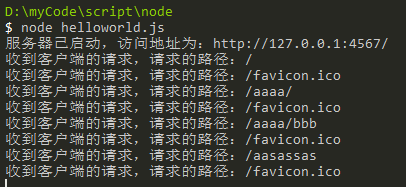
console.log("服务器已启动,访问地址为:http://127.0.0.1:4567/")
});
img

简单的web服务器(版本二)

根据不同的路径返回不同的响应结果。这里只需改造server.on()中的处理即可。

1
2
3
4
5
6
7
8
9
10
11
12
13
14
15
16
17
server.on('request', function(request, response) {
console.log('收到客户端的请求,请求的路径:' + request.url);
var url = request.url

// 根据不同的路径返回不同的响应结果
if (url === '/') {
truetrueresponse.end("index page")
} else if (url === '/a') {
truetrueresponse.end("a page")
} else if (url === '/a/bb') {
truetrueresponse.end("/a/bb page")
} else {
truetrueresponse.end("404 Not Found")
}

response.end();
});

简单的web服务器(版本三)

这个版本可以返回中文。

当未指定编码方式时,浏览器默认按照当前操作系统的编码去解析。所以再版本一中会出现中文乱码。解决方法是,告诉浏览器自己的编码方法,让浏览器以我们想要的方法解析字符串。

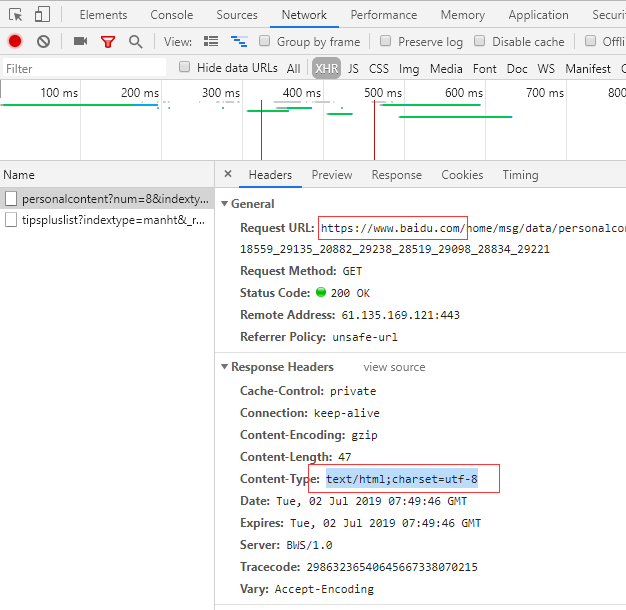
在 http 协议中,使用Content-Type 设置编码方法。例如Content-Type: text/html;charset:utf-8;。可以看到Content-Type中有2个值,text/html;charset:utf-8;

text/html;

不同的文件对应不同的值,至于什么文件对应什么Content-Type内容,这里可以百度或者谷歌Content-type对照表

常见的有下面几种:

数据格式 Content-Type(Mime-Type)
纯文本格式 text/plain
.html text/html
.img application/x-img
.jpg application/x-jpg或者 image/jpeg
.png application/x-png 或者 image/png
JSON数据格式 application/json
.bmp application/x-bmp

charset=utf-8

若是需要显示中文字符串,则设置增加charset=utf-8这个参数,若不需要,比如加载图片,则不需要这个。

例子1

下面例子是访问百度某个页面,由于其返回的是html格式的内容,所以使用的是text/html。同时设置charset=utf-8来显示中文字符串。
img

例子2

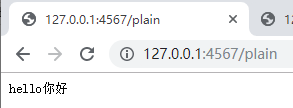
下面用来说明在node中,如何使用Content-Type。同时说明了text/plaintext/html的区别:text/plain用来加载普通文件,text/html用来加载html文件。

1
2
3
4
5
6
7
8
9
10
11
12
13
14
15
16
17
18
19
20
21
22
23
24
25
26
27
28
29
30
31
32
// 1、引入http模块
var myHttp = require('http')

// 2、使用http.createServer()来创建一个 Web服务器
var server = myHttp.createServer()

// 3、服务器具体的功能:接收并且返回消息给浏览器
server.on('request', function(request, response) {

// 这里请求的地址是任意的,并没有实现对不同的路径返回不同的消息
var url = request.url;
trueconsole.log('收到客户端的请求,请求的路径:'+url);
if(url==='/plain'){
true response.setHeader('Content-Type', 'text/plain;charset=utf-8');
truetrueresponse.end('hello你好');
true}else if(url==='/plain2'){
truetrueresponse.setHeader('Content-Type', 'text/plain;charset=utf-8');
truetrueresponse.end('<span style="font-size: 18px;color: #f31111;" >hello你好</span>');
true}else if(url==='/html'){
truetrueresponse.setHeader('Content-Type', 'text/html;charset=utf-8');
truetrueresponse.end('<span style="font-size: 18px;color: #f31111;" >hello你好</span>');
true} else {
truetrueresponse.end("404 Not Found");
true}

});

// 4、绑定端口号,启动服务器
var post = 4567;
server.listen(post, function() {
console.log("服务器已启动,访问地址为:http://127.0.0.1:4567/")
});

结果如下,可以看到,当服务器返回给页面是html代码时,text/plain;charset=utf-8则是把返回的内容当作字符串,原样输出了(http://127.0.0.1:4567/plain2)。但是将其设置为text/html;charset=utf-8时,则可以正常显示html的内容及其样式。

img

img

img

简单的web服务器(版本四)

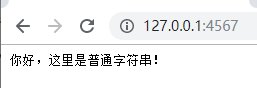
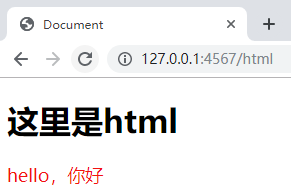
服务器返回html文件和图片等资源给浏览器。这里使用核心模块fs。当请求到服务器时,首先,先根据不同的路径执行不同的操作。其次,返回响应结果,地址若是http://127.0.0.1:4567/,则返回普通字符串;地址若是http://127.0.0.1:4567/imghttp://127.0.0.1:4567/html,则使用fs读取文件。最后,将读取的文件返回给浏览器。

1
2
3
4
5
6
7
8
9
10
11
12
13
14
15
16
17
18
19
20
21
22
23
24
25
26
27
28
29
30
31
32
33
34
35
36
37
38
39
40
41
42
43
44
45
46
47
48
49
// 1、引入http模块
var myHttp = require('http')
var fs = require('fs')

// 2、使用http.createServer()来创建一个 Web服务器
var server = myHttp.createServer()

// 3、服务器具体的功能:接收并且返回消息给浏览器
server.on('request', function(request, response) {

var url = request.url;
trueconsole.log('收到客户端的请求,请求的路径:'+url);
if(url==='/'){
truetrue// 返回普通字符串
truetrueresponse.setHeader('Content-Type', 'text/plain; charset=utf-8')
response.end('你好,这里是普通字符串!')
true}else if(url==='/img'){
truetrue// 返回图片,页面显示为下载图片
truetruefs.readFile('./resource/2.bmp', function (err, data) {
truetrue if (err) {
truetruetruetrueresponse.setHeader('Content-Type', 'text/plain; charset=utf-8');
truetruetruetrueresponse.end('文件读取失败,请稍后重试!');
truetrue } else {
truetruetruetrueresponse.setHeader('Content-Type', 'application/x-bmp');
truetruetruetrueresponse.end(data);
truetrue }
truetrue})
true}else if(url==='/html'){
truetrue// 返回html页面
truetruefs.readFile('./resource/index.html', function (err, data) {
truetrue if (err) {
truetruetruetrueresponse.setHeader('Content-Type', 'text/plain; charset=utf-8');
truetruetruetrueresponse.end('文件读取失败,请稍后重试!');
truetrue } else {
truetruetruetrueresponse.setHeader('Content-Type', 'text/html; charset=utf-8');
truetruetruetrueresponse.end(data);
truetrue }
truetrue})
true} else {
truetrueresponse.end("404 Not Found");
true}

});

// 4、绑定端口号,启动服务器
var post = 4567;
server.listen(post, function() {
console.log("服务器已启动,访问地址为:http://127.0.0.1:4567/")
});

index.html

1
2
3
4
5
6
7
8
9
10
11
<!DOCTYPE html>
<html lang="en">
<head>
<meta charset="UTF-8">
<title>Document</title>
</head>
<body>
<h1>这里是html</h1>
<span style="font-size: 18px;color: #f31111;" >hello,你好</span>
</body>
</html>
img

img

-------------本文结束 -------------

版权声明

Raccoon by Raccoon is licensed under a Creative Commons BY-NC-ND 4.0 International License.
Raccoon创作并维护的Raccoon博客采用创作共用保留署名-非商业-禁止演绎4.0国际许可证
本文首发于Raccoon 博客( https://lilysnian.github.io/ ),版权所有,侵权必究。